Templates & guides

Print-ready templates

Free Photoshop templates for our custom printing, with step-by-step videos and the exact specs. Download one, design inside the guides, save a PDF and we print it.

  1. 01DownloadPick the template that fits your case.
  2. 02DesignWork in Photoshop, inside the guides.
  3. 03Save as PDFHide the template, keep the print marks.
  4. 04OrderPaste your PDF's link when you check out.

Download

Templates

Every template is free to use for artwork we print. Each pack has the Photoshop file, a START HERE guide and a spec sheet, and the video guides are further down this page.

Slipcovers

The card sleeve that slides over the outside of the case.

14MM Blu-ray / 4K Slipcover template preview New · v1.0

Slipcovers · IC-SLP-14 v1.0

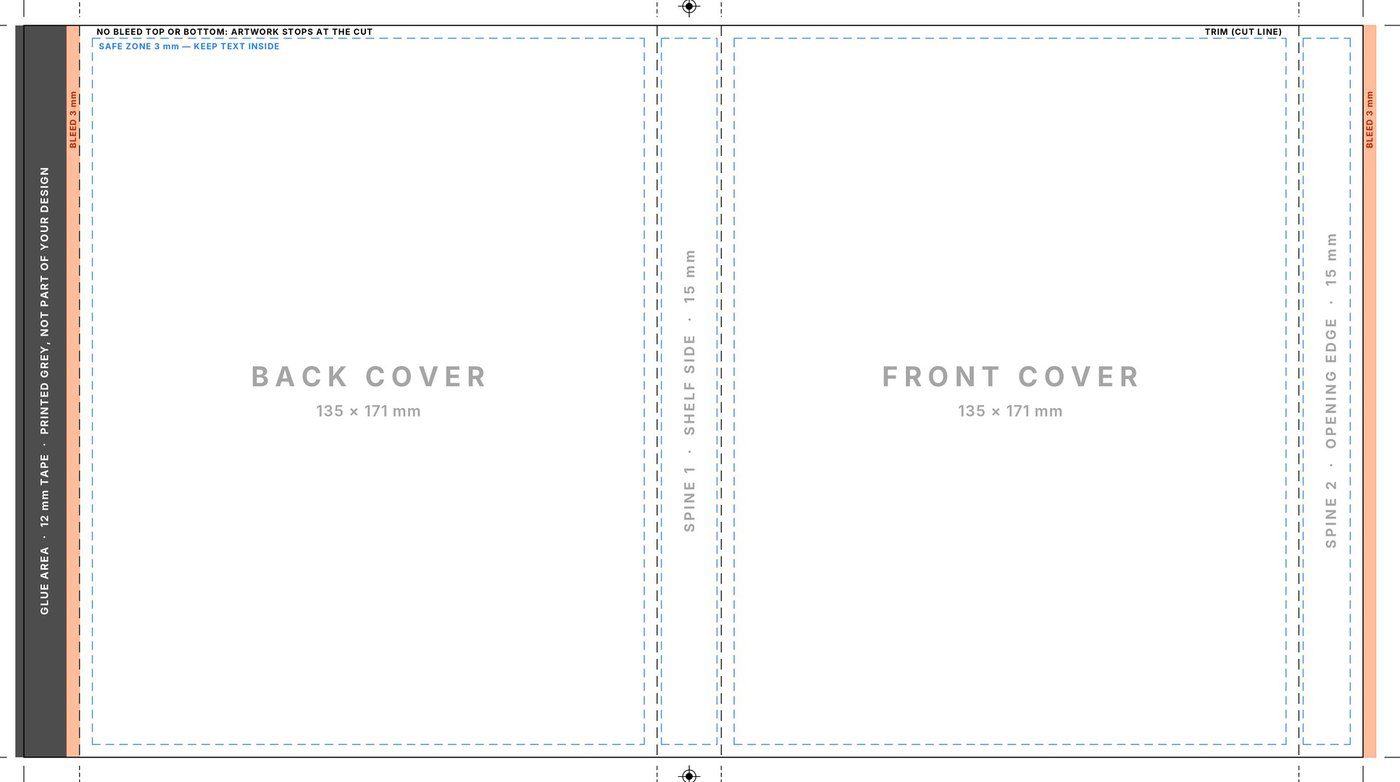
14MM Blu-ray / 4K Slipcover

Fits

  • 14 mm Blu-ray cases
  • 14 mm 4K Ultra HD cases
Finished size
313 × 171 mm
Layout, left to right
Glue 13 · back 135 · spine 15 · front 135 · spine 15 mm
Artwork area
306 × 171 mm, incl. bleed
Bleed
3 mm on the glue flap and right edge, none top or bottom
Safe zone
3 mm from the cut edges and folds
Send us
One A3 landscape PDF, 300 ppi, CMYK
Download template

ZIP · 1.4 MB: Photoshop template · START HERE guide · spec sheet · previews

11MM Blu-ray / 4K Slipcover template preview New · v1.0

Slipcovers · IC-SLP-11 v1.0

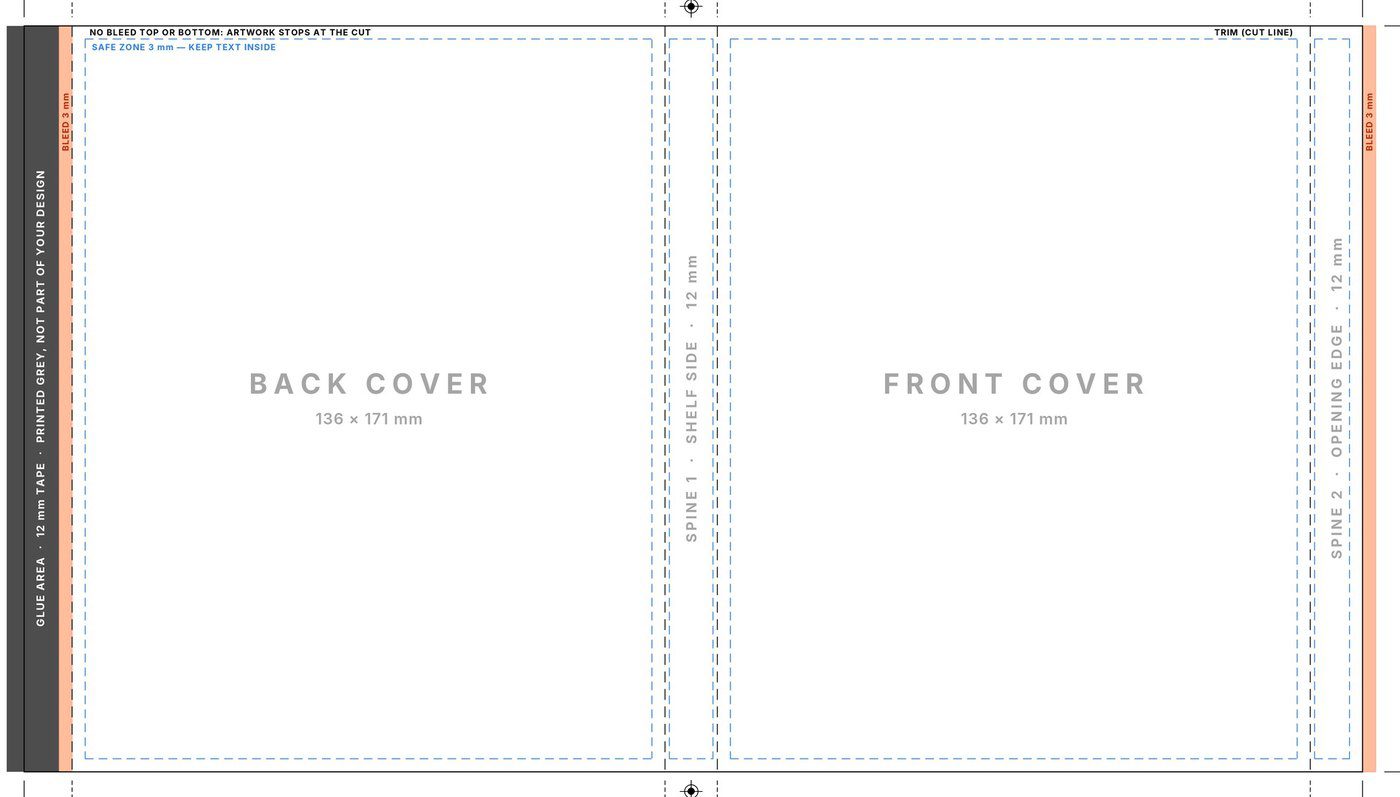
11MM Blu-ray / 4K Slipcover

Fits

  • 11 mm Blu-ray cases
  • 11 mm 4K Ultra HD cases
Finished size
307 × 171 mm
Layout, left to right
Glue 11 · back 136 · spine 12 · front 136 · spine 12 mm
Artwork area
302 × 171 mm, incl. bleed
Bleed
3 mm on the glue flap and right edge, none top or bottom
Safe zone
3 mm from the cut edges and folds
Send us
One A3 landscape PDF, 300 ppi, CMYK
Download template

ZIP · 1.4 MB: Photoshop template · START HERE guide · spec sheet · previews

Steelbook Slipcover template preview New · v1.0

Slipcovers · IC-SLP-STB v1.0

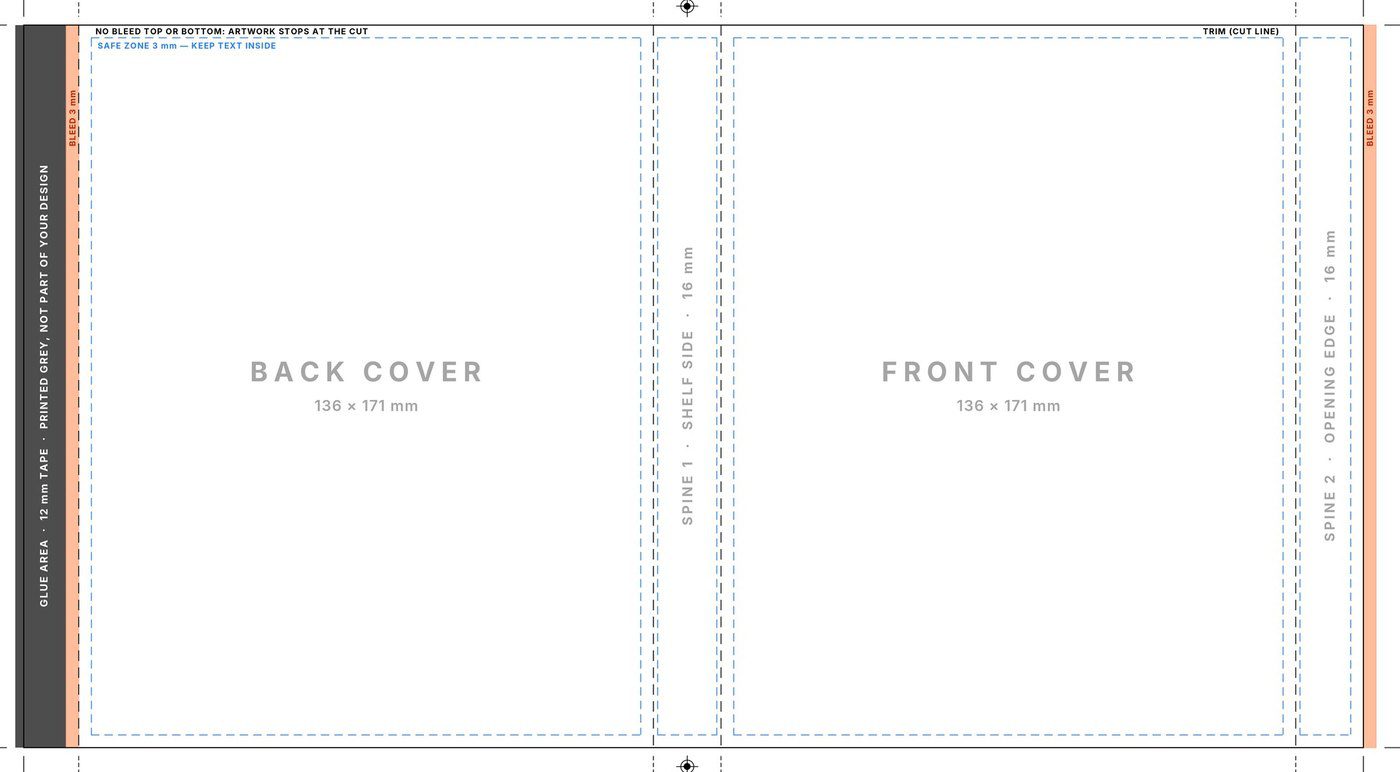
Steelbook Slipcover

Fits

  • Standard-size steelbook cases
Finished size
317 × 171 mm
Layout, left to right
Glue 13 · back 136 · spine 16 · front 136 · spine 16 mm
Artwork area
310 × 171 mm, incl. bleed
Bleed
3 mm on the glue flap and right edge, none top or bottom
Safe zone
3 mm from the cut edges and folds
Send us
One A3 landscape PDF, 300 ppi, CMYK
Download template

ZIP · 1.4 MB: Photoshop template · START HERE guide · spec sheet · previews

PS5 Slipcover template preview New · v1.0

Slipcovers · IC-SLP-PS5 v1.0

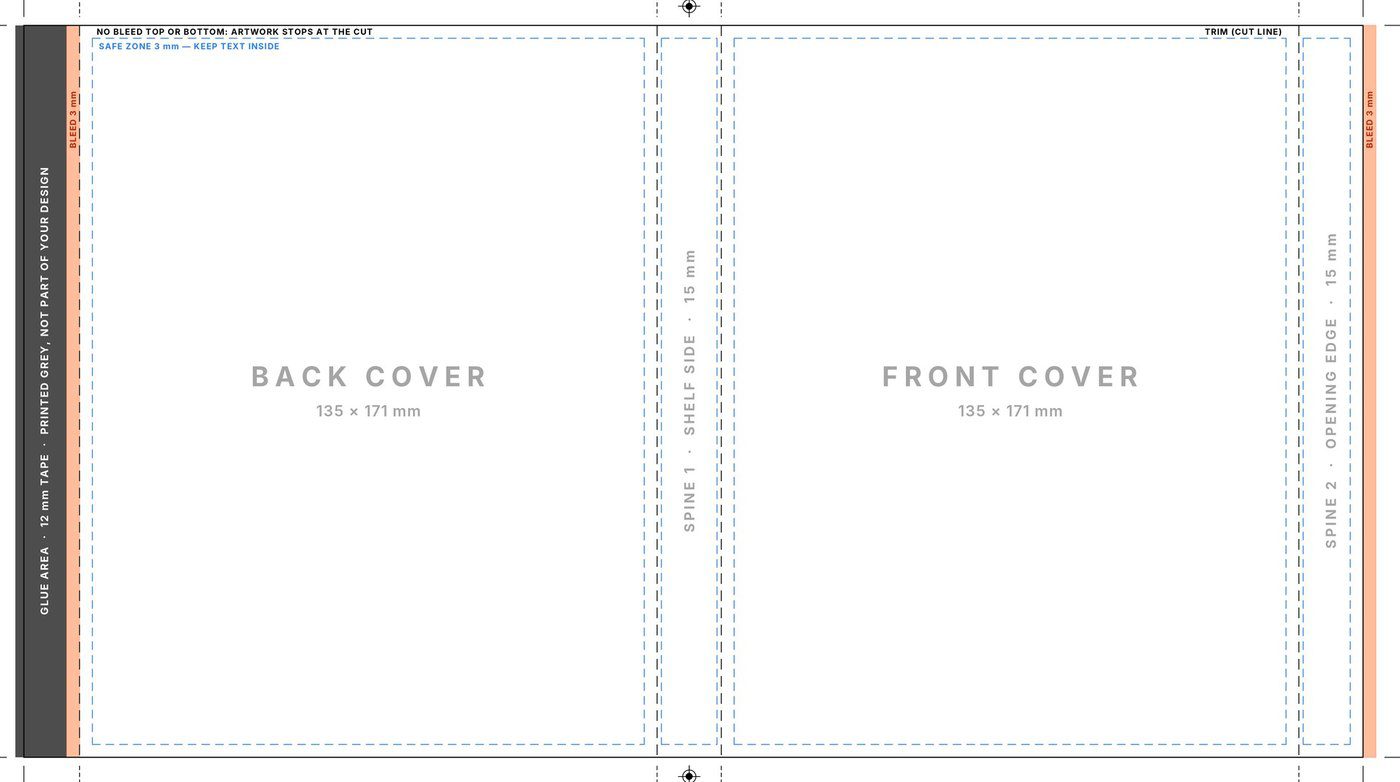
PS5 Slipcover

Fits

  • PS5 game cases
  • PS4 game cases
  • PS3 game cases
Finished size
313 × 171 mm
Layout, left to right
Glue 13 · back 135 · spine 15 · front 135 · spine 15 mm
Artwork area
306 × 171 mm, incl. bleed
Bleed
3 mm on the glue flap and right edge, none top or bottom
Safe zone
3 mm from the cut edges and folds
Send us
One A3 landscape PDF, 300 ppi, CMYK
Download template

ZIP · 1.4 MB: Photoshop template · START HERE guide · spec sheet · previews

Xbox Series X / One Slipcover template preview New · v1.0

Slipcovers · IC-SLP-XBX v1.0

Xbox Series X / One Slipcover

Fits

  • Xbox Series X game cases
  • Xbox One game cases
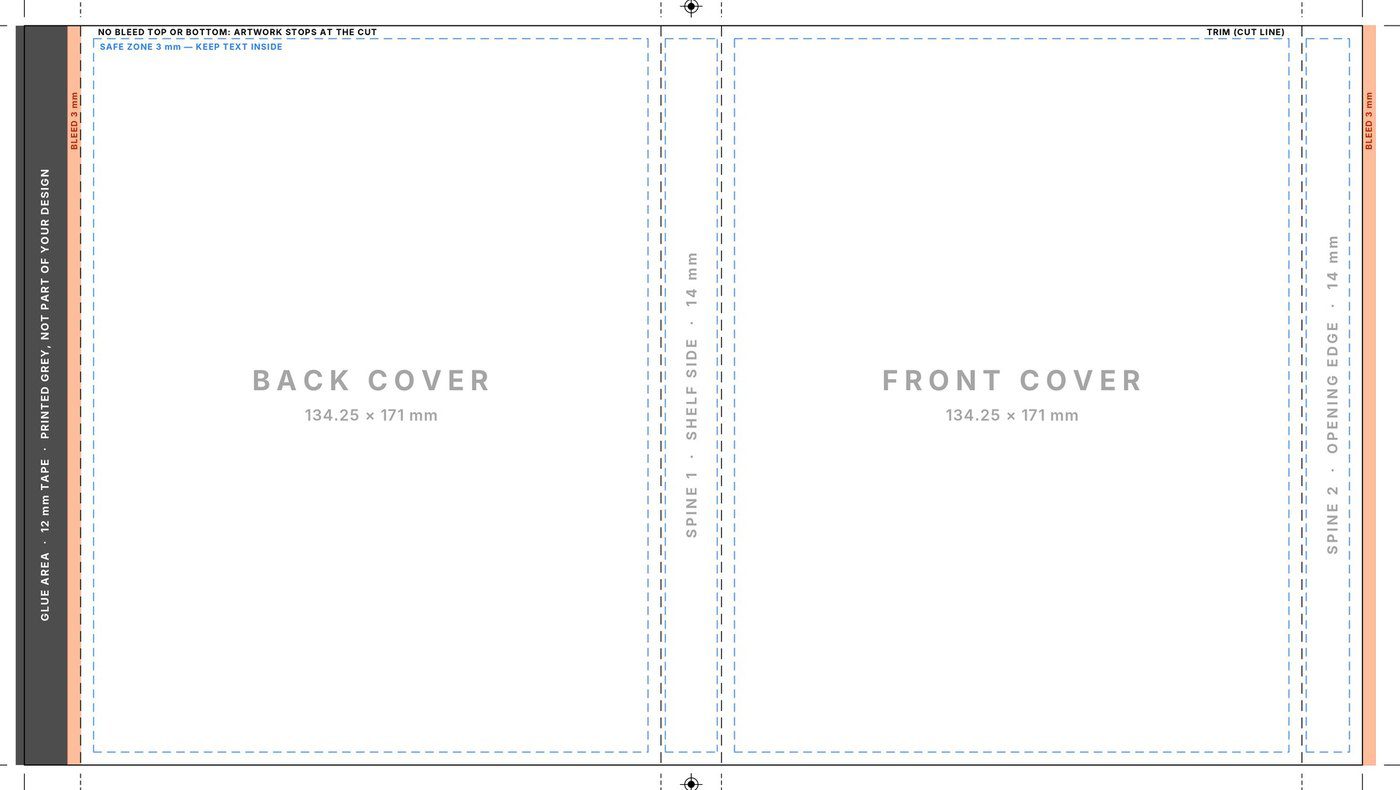
Finished size
309.5 × 171 mm
Layout, left to right
Glue 13 · back 134.25 · spine 14 · front 134.25 · spine 14 mm
Artwork area
302.5 × 171 mm, incl. bleed
Bleed
3 mm on the glue flap and right edge, none top or bottom
Safe zone
3 mm from the cut edges and folds
Send us
One A3 landscape PDF, 300 ppi, CMYK
Download template

ZIP · 1.4 MB: Photoshop template · START HERE guide · spec sheet · previews

Nintendo Switch / Switch 2 Slipcover template preview New · v1.0

Slipcovers · IC-SLP-NSW v1.0

Nintendo Switch / Switch 2 Slipcover

Fits

  • Nintendo Switch game cases
  • Nintendo Switch 2 game cases
Finished size
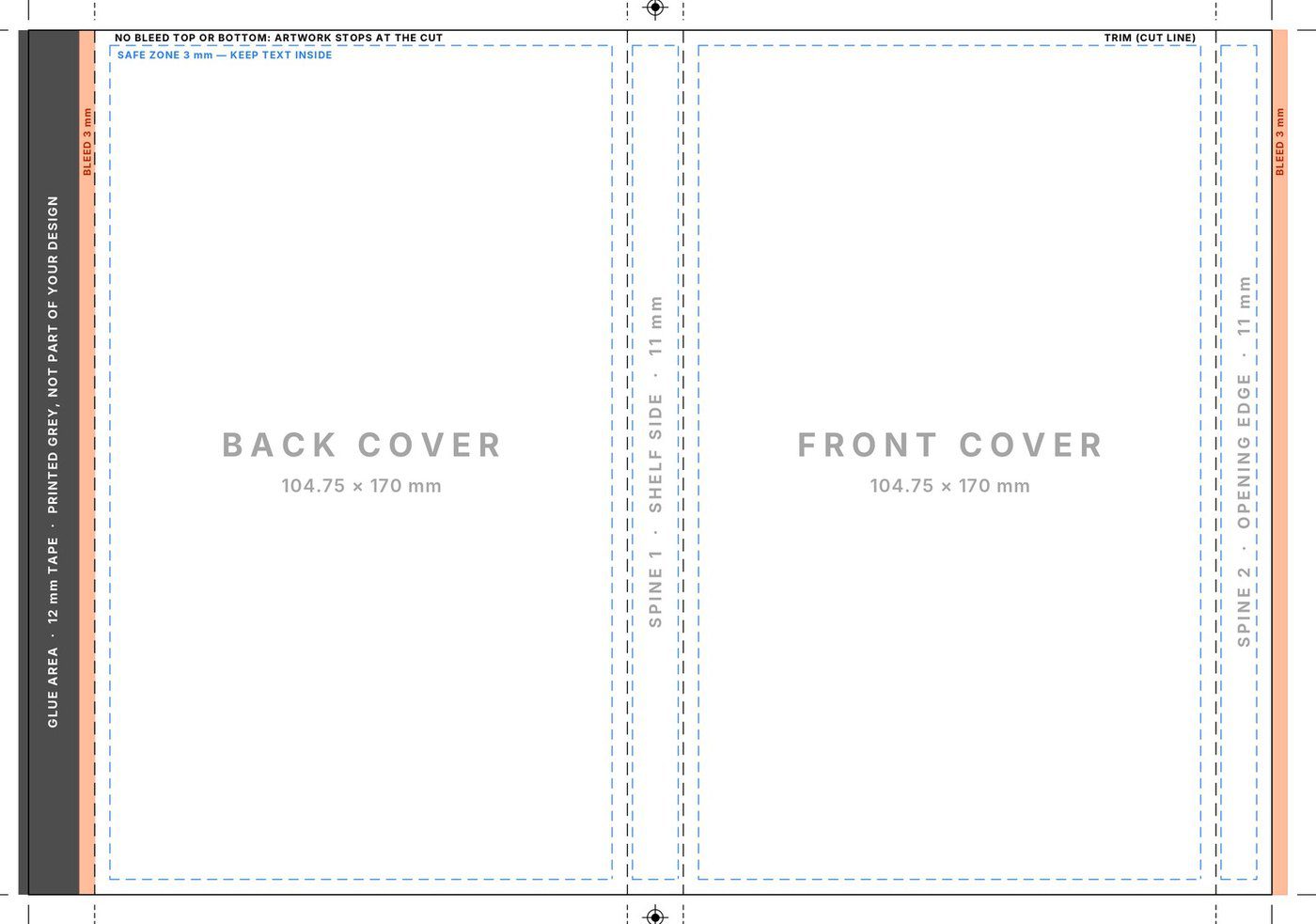
244.5 × 170 mm
Layout, left to right
Glue 13 · back 104.75 · spine 11 · front 104.75 · spine 11 mm
Artwork area
237.5 × 170 mm, incl. bleed
Bleed
3 mm on the glue flap and right edge, none top or bottom
Safe zone
3 mm from the cut edges and folds
Send us
One A3 landscape PDF, 300 ppi, CMYK
Download template

ZIP · 1.4 MB: Photoshop template · START HERE guide · spec sheet · previews

Insert covers

The printed sheet that sits inside the case, behind the clear plastic sleeve.

14MM Blu-ray Insert Cover template preview New · v1.1

Insert covers · IC-INS14-A v1.1

14MM Blu-ray Insert Cover

Fits

  • Standard Blu-ray cases (14 mm spine)
  • 4K Ultra HD cases (14 mm spine)
Finished size
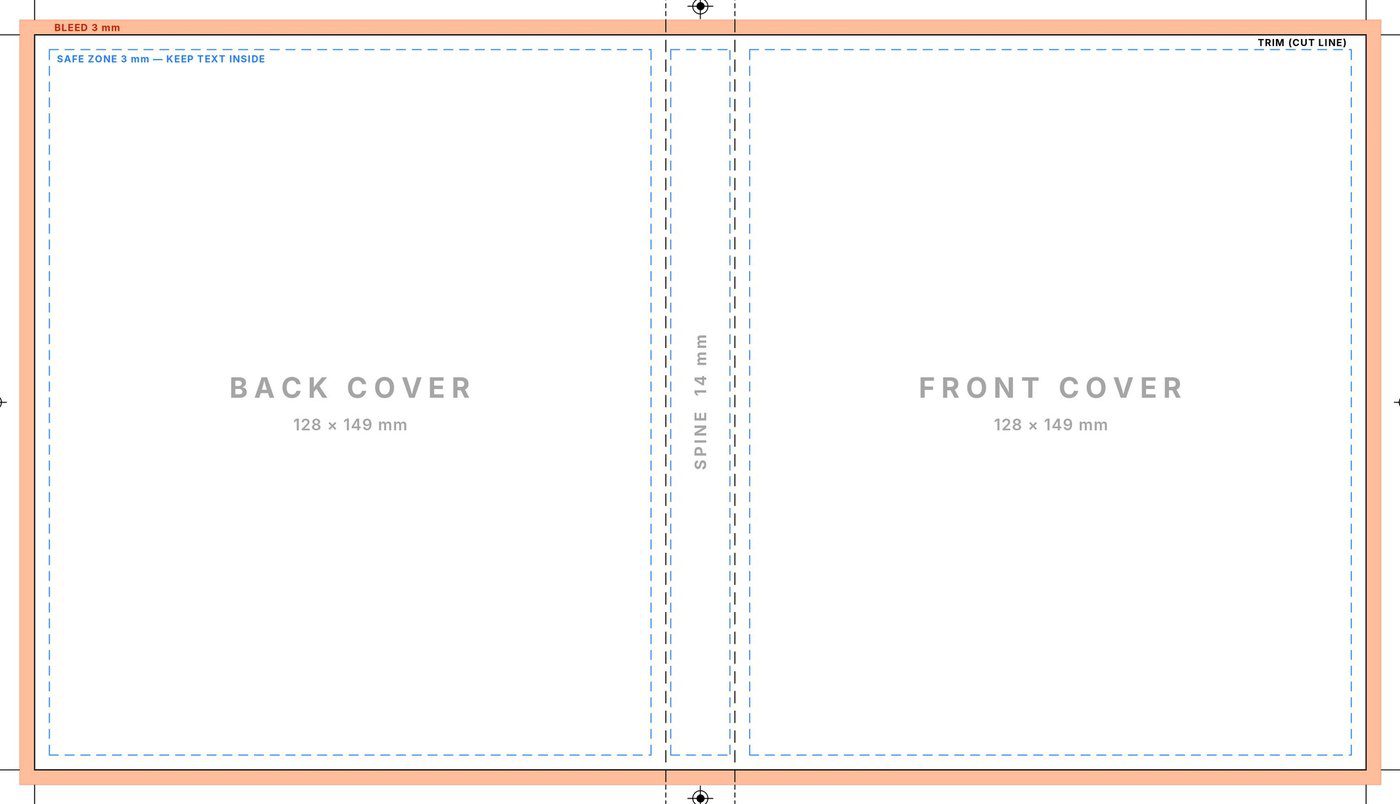
270 × 149 mm
Back · spine · front
128 · 14 · 128 mm
With 3 mm bleed
276 × 155 mm
Safe zone
3 mm inside the trim and both spine folds
Prints
Side A (outside face), single-sided
Send us
One A4 landscape PDF, 300 ppi, CMYK
Download template

ZIP · 3.3 MB: Photoshop template · START HERE guide · video guide · spec sheet · previews

11MM Slim Blu-ray Insert Cover template preview New · v1.1

Insert covers · IC-INS11-A v1.1

11MM Slim Blu-ray Insert Cover

Fits

  • Slim Blu-ray cases (11 mm spine)
  • Slim cases with a 12.5 mm spine
Finished size
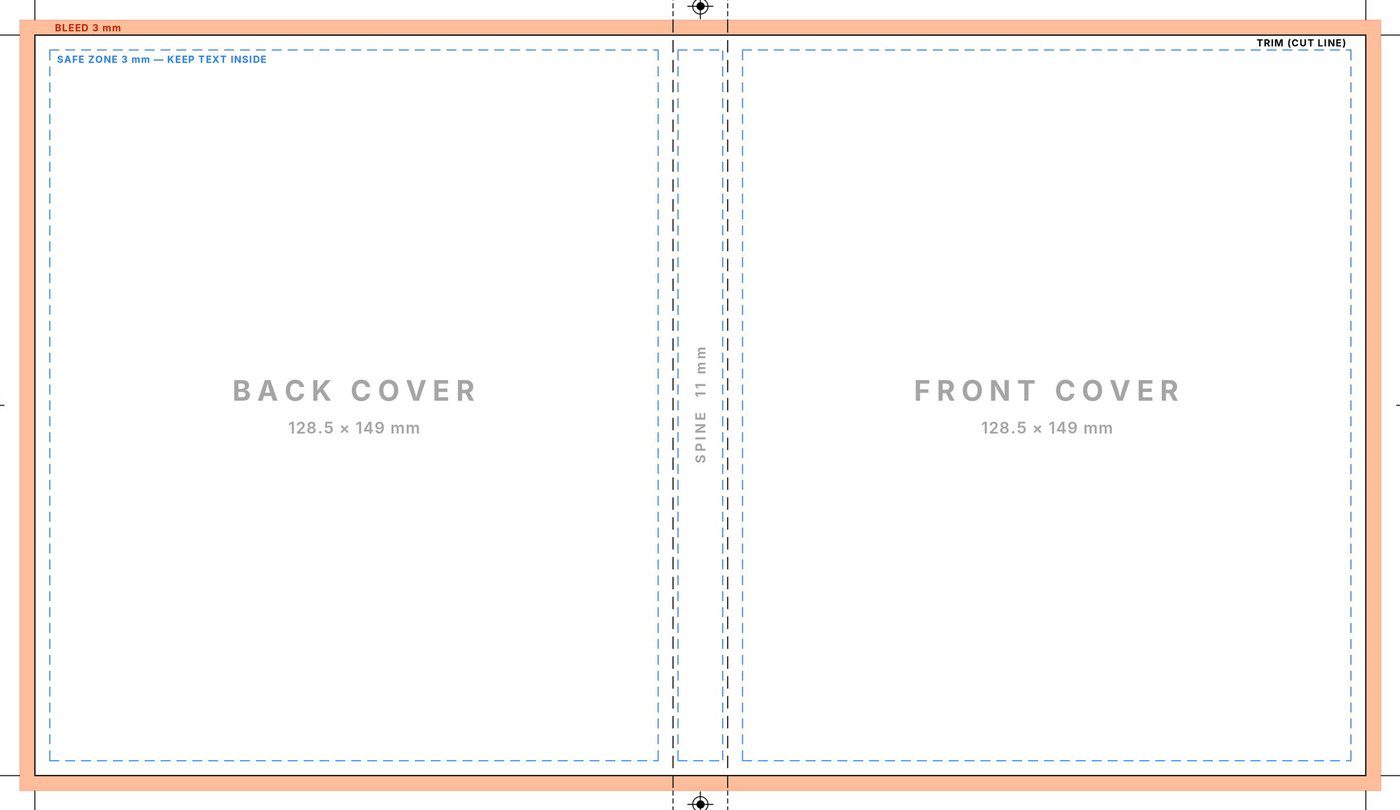
268 × 149 mm
Back · spine · front
128.5 · 11 · 128.5 mm
With 3 mm bleed
274 × 155 mm
Safe zone
3 mm inside the trim and both spine folds
Prints
Side A (outside face), single-sided
Send us
One A4 landscape PDF, 300 ppi, CMYK
Download template

ZIP · 3.3 MB: Photoshop template · START HERE guide · video guide · spec sheet · previews

Not sure which one?

Measure the spine of your case

Films: most Blu-ray and 4K Ultra HD cases have a 14 mm spine, so use the 14MM templates. Slim cases are 11 mm (or 12.5 mm for inserts): use the 11MM ones. Games and steelbooks have their own slipcover templates: PS5 (fits PS4 and PS3 too), Xbox, Switch or Steelbook. Still unsure? Ask Inky in the chat (bottom right) and tell it which case you have.

Watch

Video guides

Under a minute each. Exactly what to click in Photoshop to turn the template into a PDF we can print.

Insert covers

Save your insert as a print-ready PDF

Hide the template, keep the print marks on, and save a Photoshop PDF with the right settings.

Slipcovers

Save your slipcover as a print-ready PDF

Turn the slipcover template into a PDF we can print, then send it with your order.

Tutorials

How to get it right

The short version of the START HERE guide in every pack.

01

Bleed, trim & safe zone

  • Bleed (orange): run backgrounds and images out to this edge, 3 mm past the cut, so no white shows after trimming.
  • Trim (black line): where we cut.
  • Safe zone (blue dashes): keep text and logos inside, 3 mm from the cut and clear of both spine folds.
  • Folds: the spine edges. Centre spine text between them.
  • Glue area (slipcovers): the dark grey strip on the left is printed by us for the tape, so keep your design off it. Slipcovers have no bleed at the top or bottom: artwork stops at the cut.
BLEEDTRIMSAFE ZONEFOLDSBACKFRONT
02

Save your PDF in Photoshop

  1. Hide the GUIDES group and switch on FINAL CHECK to see your design as it will be cut.
  2. Hide the whole TEMPLATE group. Leave PRINT MARKS on.
  3. File › Save a Copy, format Photoshop PDF.
  4. Preset [High Quality Print], untick Preserve Photoshop Editing Capabilities.
  5. Compression: Do Not Downsample. Output: No Conversion.
  6. Open the PDF and run through the checklist before you order.
03

Before you order

  • Backgrounds reach the orange bleed edge
  • Text and logos sit inside the blue safe zone
  • Nothing important on the spine folds
  • Images look sharp at 100% zoom
  • The PDF is landscape (A4 for inserts, A3 for slipcovers) with no orange, blue or dashed guides
  • Crop marks, colour strip and job details show at the edges

Please don't change the page size, resolution or colour mode, crop or rotate the document, or add extra crop marks or bleed in the PDF settings. Anything visible in your PDF is printed exactly as supplied.

04

Send us your file

  1. Upload the PDF to Google Drive (or Dropbox or OneDrive).
  2. Set sharing to anyone with the link.
  3. Order insert or slipcover printing and paste the link in Design Files URL.

We print your PDF exactly as you send it, and custom prints can't be cancelled or refunded, so run through the Before you order checklist first.

Specifications

The exact sizes

Every template is set up for you. These are here if you're building your own file or want to check. All files: 300 ppi, CMYK (Coated GRACoL 2006), PDF only.

Slipcovers
14MM Blu-ray / 4K Slipcover11MM Blu-ray / 4K SlipcoverSteelbook SlipcoverPS5 SlipcoverXbox Series X / One SlipcoverNintendo Switch / Switch 2 Slipcover
Finished size313 × 171 mm307 × 171 mm317 × 171 mm313 × 171 mm309.5 × 171 mm244.5 × 170 mm
Layout, left to rightGlue 13 · back 135 · spine 15 · front 135 · spine 15 mmGlue 11 · back 136 · spine 12 · front 136 · spine 12 mmGlue 13 · back 136 · spine 16 · front 136 · spine 16 mmGlue 13 · back 135 · spine 15 · front 135 · spine 15 mmGlue 13 · back 134.25 · spine 14 · front 134.25 · spine 14 mmGlue 13 · back 104.75 · spine 11 · front 104.75 · spine 11 mm
Artwork area306 × 171 mm, incl. bleed302 × 171 mm, incl. bleed310 × 171 mm, incl. bleed306 × 171 mm, incl. bleed302.5 × 171 mm, incl. bleed237.5 × 170 mm, incl. bleed
Bleed3 mm on the glue flap and right edge, none top or bottom3 mm on the glue flap and right edge, none top or bottom3 mm on the glue flap and right edge, none top or bottom3 mm on the glue flap and right edge, none top or bottom3 mm on the glue flap and right edge, none top or bottom3 mm on the glue flap and right edge, none top or bottom
Safe zone3 mm from the cut edges and folds3 mm from the cut edges and folds3 mm from the cut edges and folds3 mm from the cut edges and folds3 mm from the cut edges and folds3 mm from the cut edges and folds
Send usOne A3 landscape PDF, 300 ppi, CMYKOne A3 landscape PDF, 300 ppi, CMYKOne A3 landscape PDF, 300 ppi, CMYKOne A3 landscape PDF, 300 ppi, CMYKOne A3 landscape PDF, 300 ppi, CMYKOne A3 landscape PDF, 300 ppi, CMYK
Insert covers
14MM Blu-ray Insert Cover11MM Slim Blu-ray Insert Cover
Finished size270 × 149 mm268 × 149 mm
Back · spine · front128 · 14 · 128 mm128.5 · 11 · 128.5 mm
With 3 mm bleed276 × 155 mm274 × 155 mm
Safe zone3 mm inside the trim and both spine folds3 mm inside the trim and both spine folds
PrintsSide A (outside face), single-sidedSide A (outside face), single-sided
Send usOne A4 landscape PDF, 300 ppi, CMYKOne A4 landscape PDF, 300 ppi, CMYK

Download the full insert cover spec (PDF)

Questions

FAQ

I don't have Photoshop. Can I use Canva or something else?
The templates are built for Photoshop, and other apps often lose the size, colour or bleed settings. If you don't have Photoshop, our partner designers can make it for you: commission a design on our Discord, or pick a ready-made design from MedsCoverEmporium.
Can you print double-sided inserts?
Not yet. Insert printing is single-sided (Side A, the outside face), so you only need the Side A template.
My images are RGB. Is that OK?
Yes. Place them as normal and Photoshop converts them to CMYK in the template. Very bright neon colours can look a little duller in print. That's normal for CMYK.
Do I add bleed or crop marks when I save?
No. The bleed is part of the template and the crop marks are on the PRINT MARKS layer. Don't add any in the PDF settings.
Can I send a PNG or JPG?
No, we only print PDFs made from our templates. The video guides show how to save one in under a minute.
Can I use the templates with another printer?
The templates are free to use for artwork printed by InkyCustoms. Please don't sell them, share them as your own or use them for other print services.

Order printing

Ready to print?

Upload your PDF to Google Drive, Dropbox or OneDrive, set it to anyone with the link, and paste the link in Design Files URL at checkout.

Need a hand? Ask Inky in the chat, or join us on Discord.